

De-identified Hubs for External Sharing
Prevent parties outside your organisation from seeing internal users’ details
De-identified sharing replaces the names and email addresses of your internal users with aliases wherever an external user would otherwise see them. Externals still see who is who, because each user keeps the same alias, but they do not see real profile names or real email addresses.
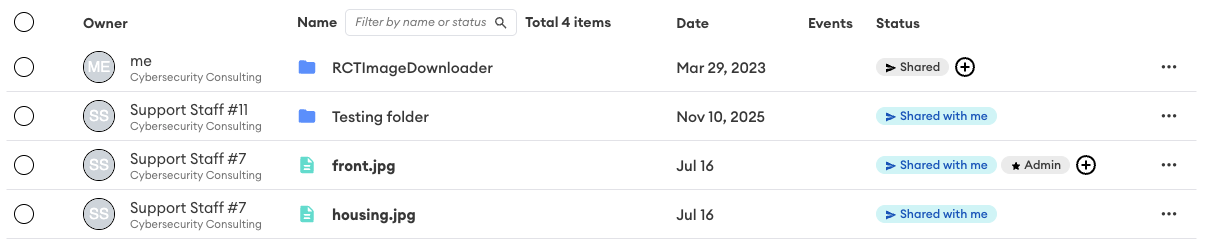
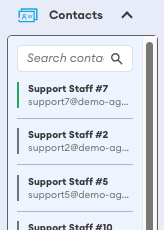
The policy applies at the tenancy level. When it is enabled, it takes effect in every Core Hub in the tenancy. It does not apply to Fusion Hubs.
Only what external users are shown changes. Real identities are retained by the platform, and internal users continue to see real names and email addresses as normal.
Where aliases appear
External users see the alias instead of the real identity in:
- the contact list
- the Owner column in the file list
- the status column, including the expanded sharing details for a file or folder
Items the external user owns themselves continue to show as me.
Configuring the policy
De-identified sharing is set by a tenancy administrator, using two values:
- Alias full name, the display name that replaces real names, for example
Support Staff # - Base alias email, the address the alias emails are generated from, for example
[email protected]
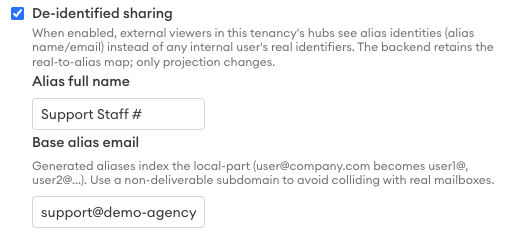
The system uses these two values as a convention and applies them to every internal user an external can see.
How aliases are numbered
The alias name and email are iterated with an appended number for each internal user. The number is added to the name you set, and it indexes the local part of the base email address.
Using the values above, users would be presented to externals as:
| Alias name | Alias email |
|---|---|
| Support Staff #1 | [email protected] |
| Support Staff #2 | [email protected] |
| Support Staff #3 | [email protected] |
Each user keeps the same alias, so an external can still tell your users apart across files, folders, and messages.
Use a non-deliverable subdomain for the base alias email so that generated aliases cannot collide with real mailboxes in your organisation.
What externals can and cannot see
De-identified sharing works alongside the controls that determine which Hub members can see and share with each other:
- External users see your team users, with the name and email de-identified.
- Other external users are hidden from the contact list completely.
Updating the conventions
The alias name and email conventions can be updated at any time. Externals will see the new convention in place of the previous one.
If the policy is disabled
External users see the real profile names and email addresses of the Team Members in the Hub, and other external users remain hidden from the contact list.